网络游戏通信方案概述
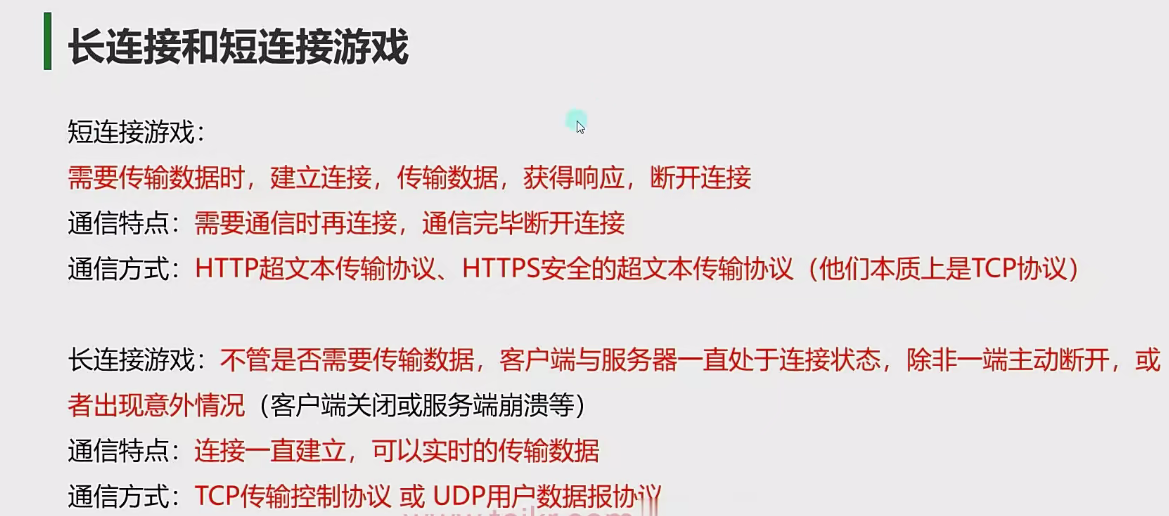
弱联网游戏 :以短时 HTTP/HTTPS 连接为主,通信频率低,可能几分钟甚至几小时才有一次通信,数据传输量少,主要是分数、道具信息等少量业务数据。核心玩法在客户端完成,客户端处理完后告知服务端结果,服务端进行验证即可,如开心消消乐、我叫 MT 等休闲游戏。强联网游戏 :采用持久的 TCP/UDP 连接,通信频率高,通常每秒可达 10-60 次,数据传输量大,包含角色位置、动作等大量实时状态数据。部分核心逻辑由服务端处理,客户端和服务端需不停同步信息,像王者荣耀、魔兽世界等多人在线实时对战游戏或大型角色扮演游戏。长连接游戏 :客户端和服务器之间保持长时间连接,在游戏过程中持续进行数据交互,能实时传输数据,保证游戏流畅性和实时性,但对服务器资源占用较大。适用于强联网游戏,如 MMORPG、MOBA、ACT 等多人在线实时对战游戏,以满足及时更新玩家状态信息等需求。短连接游戏 :客户端与服务器进行一次数据交互后就断开连接,下次有需求时再重新建立连接。连接建立和断开开销小,对服务器资源占用相对较少,但不适合实时性要求高的场景,每次连接获取数据可能存在一定延迟。对应弱联网游戏,如三消类休闲游戏、卡牌游戏等不需要频繁实时与服务器交互数据的游戏。
IP地址与端口类 在 Unity 游戏开发中,IP 地址和端口是实现网络通信的核心要素:
IP 地址 :标识网络中设备的唯一逻辑地址(如192.168.1.100),用于定位通信目标设备。端口号 :标识设备中具体的通信进程(范围 0-65535),如 HTTP 默认 80 端口、Unity 网络服务器常用 7777 端口等。
1
2
3
4
5
6
7
8
9
10
11
12
13
14
15
16
17
18
19
20
21
22
23
24
25
26
27
28
29
30
31
32
33
34
35
36
37
38
39
using System.Net;using UnityEngine;public class Lesson1 : MonoBehaviour { void Start () { #region 知识点IPAddress类 byte [] bytes = new byte []{192 ,168 ,11 ,1 }; IPAddress ip1 = new IPAddress(bytes); IPAddress ip2 = new IPAddress(0xc0a80b01 ); IPAddress ip3 = IPAddress.Parse("192.168.11.1" ); #endregion #region 知识点三IPEndPoint类 IPEndPoint ipPonit = new IPEndPoint(IPAddress.Parse("192.168.11.1" ),8080 ); #endregion } }
域名解析 在计算机网络中,域名解析 是将人类可读的域名(如www.example.com)转换为机器可识别的 IP 地址(如192.168.1.1)的过程。这一过程通过域名系统(DNS) 实现,类似于 “网络通讯录”,让用户无需记忆复杂的 IP 地址,直接通过域名访问目标服务器。
在 Unity 中进行域名解析(将域名转换为 IP 地址)可通过Dns.GetHostEntry或Dns.GetHostAddresses方法实现。
1
2
3
4
5
6
7
8
9
10
11
12
13
14
15
16
17
18
19
20
21
22
23
24
25
26
27
28
29
30
31
32
33
34
35
36
37
38
39
40
41
42
43
44
45
46
using System.Net;using UnityEngine;using System.Threading.Tasks;public class lesson2 : MonoBehaviour { void Start () { print(Dns.GetHostName()); IPHostEntry ipHostEntry = Dns.GetHostEntry("www.baidu.com" ); for (int i = 0 ;i<ipHostEntry.AddressList.Length;i++ ) { print("ip地址" +ipHostEntry.AddressList[i]); } for (int i = 0 ;i<ipHostEntry.Aliases.Length;i++ ) { print("主机别名" +ipHostEntry.Aliases[i]); } print("DNS服务器名称" +ipHostEntry.HostName); GetHostEntryAsync("www.baidu.com" ); } private async void GetHostEntryAsync (string hostName Task<IPHostEntry> task = Dns.GetHostEntryAsync(hostName); await task; for (int i =0 ;i<task.Result.AddressList.Length;i++ ) { print("ip地址" +task.Result.AddressList[i]); } for (int i =0 ;i<task.Result.Aliases.Length;i++) { print("主机别名" +task.Result.Aliases[i]); } print("DNS服务器名称" +task.Result.HostName); } }
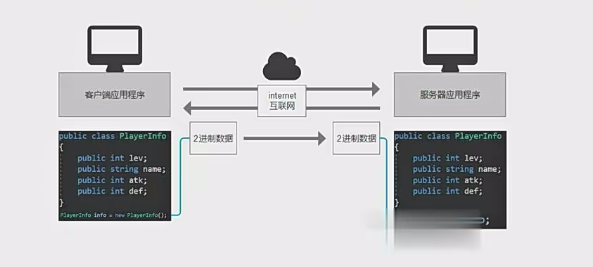
序列化和反序列化2进制数据 序列化 :将类对象信息转换为可保存或传输的格式的过程
字符串类型以及非字符串类型转换为字节数组分别使用BitConverter类和Encoding类进行转换
1
2
byte [] bytes = BitConverter.GetBytes(1 ); byte [] bytes1 = Encoding.UTF8.GetBytes("11111" );
对于如何将类序列化,不能直接使用C#中的BinaryFormatter进行2进制的序列化,因为是C#语言的规则与其他语言的兼容性不好,如果使用它那么其他语言开发的服务器无法进行反序列化,使用需要自定义处理类对象
反序列化 :与序列化相对,将保存或传输过来的格式转换为类对象的过程
UTF-8 为何成为网络通信的首选?
优势维度 具体表现
兼容性 支持全球语言,跨平台 / 系统通用,与 ASCII 无缝兼容。
存储效率 可变长编码,英文等常用字符占用字节少,压缩后传输流量更低。
处理便捷性 无字节序问题,错误定位容易,协议与工具链支持完善。
生态与标准 W3C、HTTP 等国际标准强制推荐,开源社区和工具默认支持。
未来扩展性 支持 Unicode 持续更新,适应多语言内容增长需求。
套接字Socket Socket(套接字)是网络通信的端点,用于不同主机或同一主机上的不同进程之间的通信。在C#中,Socket类封装了Berkeley套接字接口。一个Socket对象表示一个本地或者远程套接字信息,它可以被视为一个数据通道,这个通道连接客户端和服务端,通过这个通道收发消息,
主要协议类型
Stream Socket (SOCK_STREAM) : 面向连接的TCP协议:提供面向连接的,可靠的,有序的,数据无差错的且无重复的数据传输任务Datagram Socket (SOCK_DGRAM) : 无连接的UDP协议:提供无连接的,不可靠的,数据包不能大于32kb的通信服务Raw Socket (SOCK_RAW) : 原始套接字
Socket的构造函数的存在3个参数,分别是AddressFamity(网络寻址,枚举类型,决定寻址放案ipv4,ipv6),Socket枚举类型(决定使用的套接字类型),ProtocolType(协议枚举类型,决定套接字使用的通信协议)
1 2 3 4 5 Socket tcpSocket = new Socket(AddressFamily.InterNetwork, SocketType.Stream, ProtocolType.Tcp); Socket udpSocket = new Socket(AddressFamily.InterNetwork, SocketType.Dgram, ProtocolType.Udp);
TCP同步通信 套接字的常用属性 1 2 3 4 5 6 7 8 9 10 11 12 13 14 15 16 17 18 19 20 21 if (tcpSocket.Connected){ } print(tcpSocket.SocketType); print(tcpSocket.ProtocolType); print(tcpSocket.AddressFamily); print(tcpSocket.Available); print(tcpSocket.LocalEndPoint as IPEndPoint); print(tcpSocket.RemoteEndPoint as IPEndPoint);
Tcp客户端的常用方法 1 2 3 4 5 6 7 8 9 10 11 12 13 14 15 16 17 18 19 20 21 Socket clientSocket = new Socket(AddressFamily.InterNetwork, SocketType.Stream, ProtocolType.Tcp); IPEndPoint endPoint = new IPEndPoint(IPAddress.Parse("127.0.0.1" ), 8888 ); clientSocket.Connect(endPoint); string message = "Hello Server!" ;byte [] data = Encoding.UTF8.GetBytes(message);clientSocket.Send(data); byte [] buffer = new byte [1024 ];int bytesReceived = clientSocket.Receive(buffer);string response = Encoding.UTF8.GetString(buffer, 0 , bytesReceived);Console.WriteLine($"服务器响应: {response} " ); clientSocket.Shutdown(SocketShutdown.Both); clientSocket.Close();
Tcp 服务端的常用方法 1 2 3 4 5 6 7 8 9 10 11 12 13 14 15 16 17 18 19 20 21 22 23 24 25 26 27 28 29 30 31 Socket serverSocket = new Socket(AddressFamily.InterNetwork, SocketType.Stream, ProtocolType.Tcp); IPEndPoint endPoint = new IPEndPoint(IPAddress.Any, 8080 ); serverSocket.Bind(endPoint); serverSocket.Listen(10 ); Console.WriteLine("服务器已启动,等待客户端连接..." ); Socket clientSocket = serverSocket.Accept(); Console.WriteLine($"客户端已连接: {clientSocket.RemoteEndPoint} " ); byte [] buffer = new byte [1024 ];int bytesReceived = clientSocket.Receive(buffer);string receivedData = Encoding.UTF8.GetString(buffer, 0 , bytesReceived);Console.WriteLine($"接收到数据: {receivedData} " ); string response = "Hello Client!" ;byte [] responseData = Encoding.UTF8.GetBytes(response);clientSocket.Send(responseData); clientSocket.Shutdown(SocketShutdown.Both); clientSocket.Close(); serverSocket.Close();
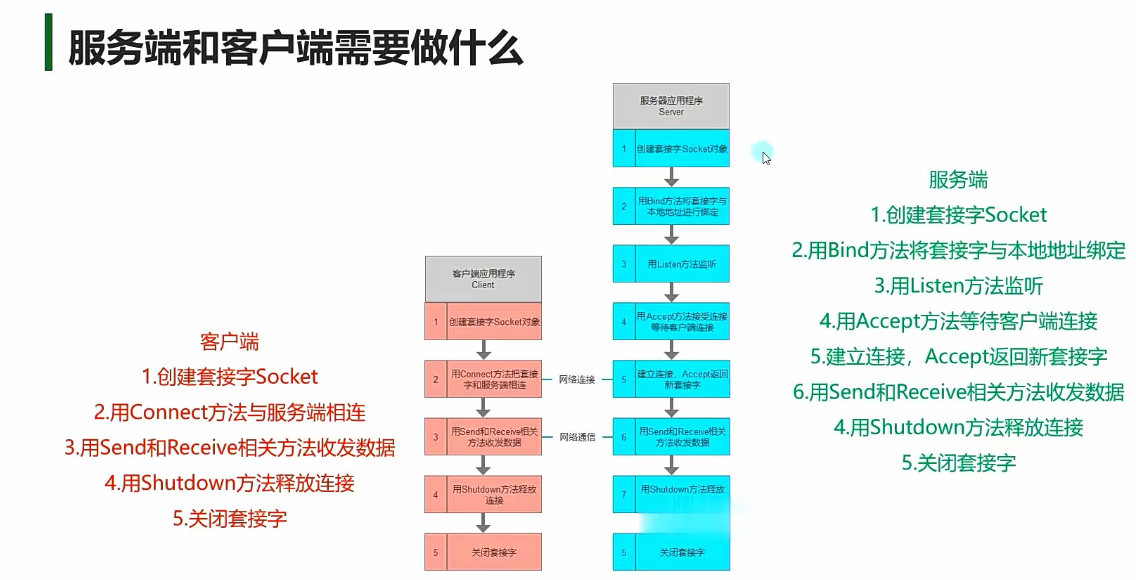
Tcp服务端的操作流程 创建Socket对象
1 2 3 4 Socket serverSocket = new Socket( AddressFamily.InterNetwork, SocketType.Stream, ProtocolType.Tcp);
绑定IP和端口
1 2 3 4 5 IPEndPoint localEP = new IPEndPoint( IPAddress.Any, 8080 ); serverSocket.Bind(localEP);
开始监听
1 2 serverSocket.Listen(10 ); Console.WriteLine("服务器已启动,等待连接..." );
接受客户端连接
1 2 Socket clientSocket = serverSocket.Accept(); Console.WriteLine($"客户端已连接: {clientSocket.RemoteEndPoint} " );
数据通信
1 2 3 4 5 6 7 8 9 10 string welcomeMsg = "欢迎连接到服务器" ;byte [] sendData = Encoding.UTF8.GetBytes(welcomeMsg);clientSocket.Send(sendData); byte [] buffer = new byte [1024 ];int recv = clientSocket.Receive(buffer); string receivedMsg = Encoding.UTF8.GetString(buffer, 0 , recv);Console.WriteLine($"收到消息: {receivedMsg} " );
关闭连接
1 2 3 clientSocket.Shutdown(SocketShutdown.Both); clientSocket.Close(); serverSocket.Close();
Tcp客户端的操作流程 创建Socket对象
1 2 3 4 Socket clientSocket = new Socket( AddressFamily.InterNetwork, SocketType.Stream, ProtocolType.Tcp);
连接服务器
1 2 3 4 5 6 7 8 9 10 11 IPEndPoint ipPoint = new IPEndPoint( IPAddress.Parse("127.0.0.1" ), 8080 ); try { clientSocket.Connect(ipPoint); Console.WriteLine("已连接到服务器" ); } catch (SocketException ex) { Console.WriteLine($"连接失败: {ex.Message} " ); return ; }
数据通信
1 2 3 4 5 6 7 8 9 10 byte [] buffer = new byte [1024 ];int recv = clientSocket.Receive(buffer);string welcomeMsg = Encoding.UTF8.GetString(buffer, 0 , recv);Console.WriteLine($"服务器消息: {welcomeMsg} " ); string message = "Hello Server!" ;byte [] sendData = Encoding.UTF8.GetBytes(message);clientSocket.Send(sendData);
关闭连接
1 2 3 clientSocket.Shutdown(SocketShutdown.Both); clientSocket.Close(); Console.WriteLine("连接已关闭" );
服务端为什么需要两个Socket? 监听Socket
作用 :不参与实际数据传输 。生命周期 :关键特性 :
调用Accept()时会阻塞,直到有客户端连接
一个监听Socket可以接受多个客户端连接
客户端通信Socket
作用 :特定客户端 进行一对一的数据传输(收发数据),像”专属客服”。生命周期 :每个客户端连接都会创建一个新实例 。关键特性 :
通过Receive()/Send()与客户端交互
包含客户端的IP和端口信息(RemoteEndPoint)
设计原因
监听Socket
客户端通信Socket
职责分离 只处理连接请求
只处理数据交换
并发支持 一个监听Socket可服务多个客户端
每个客户端独立Socket
资源优化 占用固定资源
按需创建/销毁
安全控制 统一管理连接请求
独立控制每个连接
客户端Socket的单一性原理 客户端只需要一个Socket对象的原因在于其单向连接特性 :单个Socket完成了建立连接和通信的功能
对比项
服务器端
客户端
角色 被动接受多个连接
主动发起单个连接
Socket职责 监听Socket + N个通信Socket
单个Socket同时负责连接和数据传输
生命周期 监听Socket长期存在
连接建立到断开期间存在
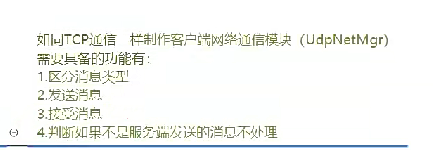
区分消息类型 当序列化的2进制数据发送给对象时,应该如何去区分消息以及如何去使用对于的数据类去反序列化2进制数据?
在所有的发送的消息前加上ID(int ,short等待),即字节数组的头部加上ID。如果选用int类型作为消息ID的类型,那么在解析数据前,先把前4个字节取出来解析为消息ID,在根据ID进行消息的反序列化
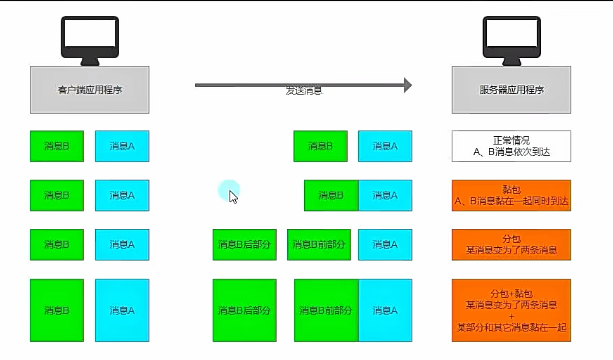
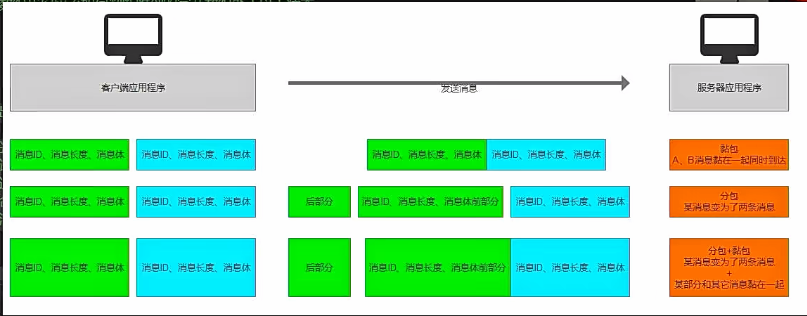
分包和黏包 分包:一个消息分为多条消息发送
黏包:一个消息和另一个消息黏在一起(同时到达,变成了一个字节数组)
两者可能同时发生
如何去判断一条消息的发送是否出现了分包和黏包?
通过在消息体前面加上消息长度的字段来进行区分,解析消息的长度来判断到收到的消息体的字节数组是否满足长度,不够则出现了分包,超出则出现了黏包
场景
判断条件
处理方式
正常消息 收到的字节数 == TotalLength
直接反序列化
分包(半包) 收到的字节数 < TotalLength
等待后续数据
黏包 收到的字节数 > TotalLength 或 缓冲区包含多个TotalLength标识的消息截取第一条完整消息,保留剩余数据
客户端主动断开连接 实现心跳机制 心跳消息:在长连接时,客户端和服务端之间定期发送的一种特殊的数据包用于通知对方自己还在线,确保长连接的有效性。(发送间隔是固定的持续的)
避免非正常的关闭客户端时,服务器无法准确的收到关闭连接的消息
避免客户端长期不发送消息,防火墙或者路由器会断开连接,使用心跳消息一直保持活跃消息
客户端实现定时发送消息的功能,服务端不停检测上次收到某客户端的消息的时间,如果超时则认为连接已经断开。
1 2 3 4 InvokeRepeating("SendHeartMsg" ,0 ,2 ); public void SendHeartMsg ()}
TCP异步通信 Begin开头的方法
BeginAccept:服务端的连接方法,EndAccept
BeginConnect:客户端的连接方法,EndConnect
BeginReceive:服务端和客户端接受信息的方法,EndReceive
BeginSend:服务端和客户端发送消息的方法,EndSend
BeginAccept 的方法签名如下:
1 public IAsyncResult BeginAccept (AsyncCallback callback, object state )
BeginConnect 的方法签名如下:
1 2 3 4 5 public IAsyncResult BeginConnect ( EndPoint remoteEP, AsyncCallback callback, object state
remoteEP:目标服务端的终结点(如 IPEndPoint)。callback:连接完成时调用的回调函数。state:传递到回调的用户自定义对象(通常是客户端 Socket)。
BeginAccept 的方法签名如下:
1 2 3 4 5 6 7 8 public IAsyncResult BeginSend ( byte [] buffer, int offset, int size, SocketFlags socketFlags, AsyncCallback callback, object state
buffer:要发送的数据字节数组。offset:数据起始偏移量。size:要发送的字节数。socketFlags:发送行为的标志(如 SocketFlags.None)。callback:发送完成时调用的回调函数。state:传递到回调的用户自定义对象(通常是当前 Socket)。
BeginReceive 的方法签名如下:
1 2 3 4 5 6 7 8 public IAsyncResult BeginReceive ( byte [] buffer, int offset, int size, SocketFlags socketFlags, AsyncCallback callback, object state
buffer:存储接收数据的字节数组。offset:数据存储的起始偏移量。size:要接收的最大字节数。socketFlags:接收行为的标志(如 SocketFlags.None)。callback:接收完成时调用的回调函数。state:传递到回调的用户自定义对象(通常是当前 Socket)。
1 2 3 4 5 6 7 8 9 10 11 12 13 14 15 16 17 18 19 20 21 22 23 24 25 26 27 28 29 30 31 32 33 34 35 36 37 38 39 40 41 42 43 44 45 46 47 48 49 50 51 52 53 54 55 56 57 58 59 60 61 62 63 64 65 66 67 68 69 70 71 72 73 74 75 76 77 78 using System.Collections;using System.Collections.Generic;using System.Net.Sockets;using UnityEngine;using System;using System.Net;using System.Text;public class Lesson12 : MonoBehaviour { private byte [] buffer = new byte [1024 ]; void Start () { Socket socketTcp = new Socket(AddressFamily.InterNetwork, SocketType.Stream, ProtocolType.Tcp); socketTcp.BeginAccept(AcceptCallback,socketTcp); IPEndPoint ipPoint = new IPEndPoint(IPAddress.Parse("127.0.0.1" ),8080 ); socketTcp .BeginConnect(ipPoint,(result)=>{ Socket s = result.AsyncState as Socket; try { s.EndConnect(result); Debug.Log("连接成功" ); } catch (SocketException e){ Debug.LogError(e); } },socketTcp); socketTcp.BeginReceive(buffer,0 ,buffer.Length,SocketFlags.None,ReceiveCallback,null ); byte [] sendMsg = Encoding.UTF8.GetBytes("Hello, World!" ); socketTcp.BeginSend(sendMsg,0 ,sendMsg.Length,SocketFlags.None,SendCallback,socketTcp); } private void AcceptCallback (IAsyncResult result ) try { s.BeginAccept(AcceptCallback,null ); } catch (SocketException e){ Debug.LogError(e); } } private void ReceiveCallback (IAsyncResult result ) Socket s = result.AsyncState as Socket; try { int num = s.EndReceive(result); Encoding.UTF8.GetString(buffer,0 ,num); Debug.Log("服务器收到消息:" ); s.BeginReceive(buffer,0 ,buffer.Length,SocketFlags.None,ReceiveCallback,null ); } catch (SocketException e){ Debug.LogError(e); } } private void SendCallback (IAsyncResult result ) try { Socket s = result.AsyncState as Socket; s.EndSend(result); s.BeginSend(buffer,0 ,buffer.Length,SocketFlags.None,SendCallback,null ); } catch (SocketException e){ Debug.LogError(e); } } void Update () { } }
Async结尾的方法 服务端连接
1 2 3 4 5 6 7 8 9 10 11 12 13 14 void Start () Socket socketTcp = new Socket(AddressFamily.InterNetwork, SocketType.Stream, ProtocolType.Tcp); SocketAsyncEventArgs e = new SocketAsyncEventArgs(); e.Completed +=(socket,args )=>{ if (args .SocketError == SocketError.Success) { Socket clientSocket = args .AcceptSocket; (socket as Socket).AcceptAsync(e); } else { } } sockerTcp.AcceptAsync(e); }
客户端连接
1 2 3 4 5 6 7 8 9 10 11 12 void Start () Socket socketTcp = new Socket(AddressFamily.InterNetwork, SocketType.Stream, ProtocolType.Tcp); SocketAsyncEventArgs e2 = new SocketAsyncEventArgs(); e2.Completed +=(socket,args )=>{ if (args .SocketError == SocketError.Success) { } else { } } sockerTcp.AcceptAsync(e2); }
客户端和服务端之间的通信
1 2 3 4 5 6 7 8 9 10 11 12 13 14 15 16 17 18 19 20 21 22 23 24 25 26 27 28 29 30 31 32 33 34 void Start () SocketAsyncEventArgs e3 = new SocketAsyncEventArgs(); byte [] buffer = Encoding.UTF8.GetBytes("Hello, World!" ); e3.SetBuffer(buffer,0 ,buffer.Length); e3.Completed +=(socket,args ) =>{ if (args .SocketError == SocketError.Success){ print("通信成功" ); } else { print("通信失败" +args .SocketError); } }; sockerTcp.SendAsync(e3); SocketAsyncEventArgs e4 = new SocketAsyncEventArgs(); byte [] buffer1 = new byte [1024 ]; e4.SetBuffer(buffer1,0 ,buffer1.Length); e4.Completed +=(socket,args ) =>{ if (args .SocketError == SocketError.Success){ print("接收成功" ); Encoding.UTF8.GetString(args .Buffer,0 ,args .BytesTransferred); args .SetBuffer(buffer1 ,0 ,buffer1.Length); (socket as Socket).ReceiveAsync(e4); } else { print("接收失败" +args .SocketError); } }; sockerTcp.ReceiveAsync(e4); }
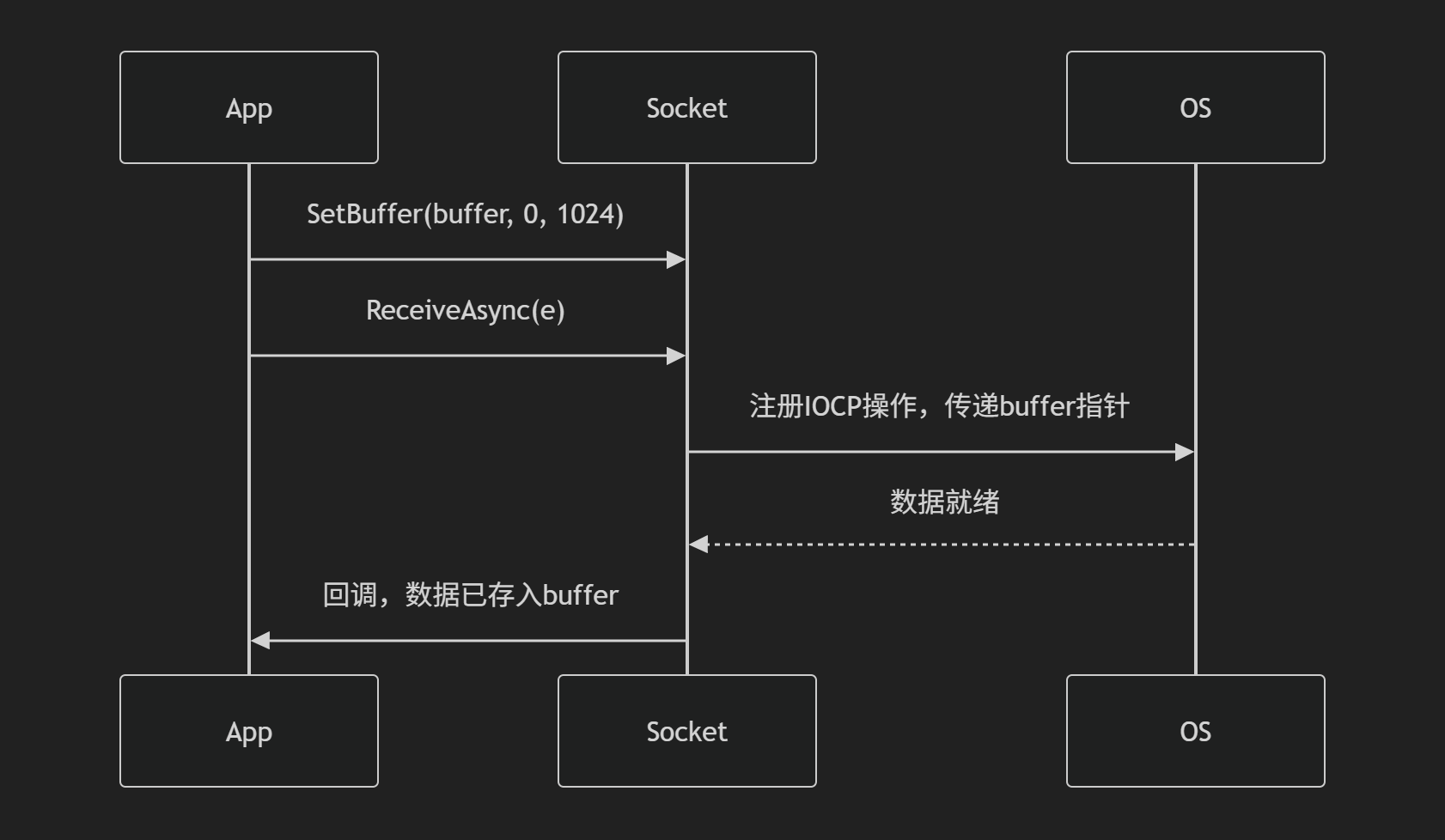
SocketAsyncEventArgs.SetBuffer()为它为异步 Socket 操作(发送/接收)配置数据缓冲区。
分配工作区间 :为异步操作指定存储数据的字节数组避免重复分配 :可重用同一缓冲区进行多次操作,减少GC压力
1 public void SetBuffer (byte [] buffer, int offset, int count
参数
类型
作用域
典型值示例
bufferbyte[]数据存储物理空间
new byte[1024]
offsetint操作起始位置
0 (从数组开头)
countint最大操作字节数
buffer.Length
异步通信的客户端和服务端 服务端的ServerSocket:通过服务端与客户端的连接以及广播,使用异步BeginAccept方法进行连接。同时将连入的客户端存入客户端字典,管理所有与服务端连接的客户端。
1 2 3 4 5 6 7 8 9 10 11 12 13 14 15 16 17 18 19 20 21 22 23 24 25 26 27 28 29 30 31 32 33 34 35 36 37 38 39 40 41 42 43 44 45 46 47 48 49 50 51 52 53 54 55 56 57 58 59 using System;using System.Collections.Generic;using System.Linq;using System.Net;using System.Net.Sockets;using System.Text;using System.Threading.Tasks;namespace AsyncServerSocket { class ServerSocket { private Socket socket; private Dictionary<int , ClientSocket> clientDic = new Dictionary<int , ClientSocket>(); public void Start (string ip, int port, int num { socket = new Socket(AddressFamily.InterNetwork, SocketType.Stream, ProtocolType.Tcp); IPEndPoint ipPoint = new IPEndPoint(IPAddress.Parse(ip), port); try { socket.Bind(ipPoint); socket.Listen(num); socket.BeginAccept(AccpetCallback, null ); } catch (Exception e) { Console.WriteLine("连接失败" + e.Message); } } public void AccpetCallback (IAsyncResult result ) { try { Socket clientSocket = socket.EndAccept(result); ClientSocket client = new ClientSocket(clientSocket); clientDic.Add(client.clientID, client); socket.BeginAccept(AccpetCallback, null ); } catch (Exception e) { { Console.WriteLine("客户端连入失败" + e.Message); } } } public void Broadcast (string str { foreach (var socket in clientDic.Values) { socket.Send(str); } } } }
服务端的中的客户端:封装客户端连接状态 :每个客户端都有自己的状态
每个客户端连接都有自己的状态(如socket、ID、缓存等),需要独立管理
ClientSocket类封装了这些状态和相关的操作逻辑
1 2 3 4 5 6 7 8 9 10 11 12 13 14 15 16 17 18 19 20 21 22 23 24 25 26 27 28 29 30 31 32 33 34 35 36 37 38 39 40 41 42 43 44 45 46 47 48 49 50 51 52 53 54 55 56 57 58 59 60 61 62 63 64 65 66 67 68 69 70 71 72 73 using System;using System.Collections.Generic;using System.Linq;using System.Net.Sockets;using System.Text;using System.Threading.Tasks;namespace AsyncServerSocket { class ClientSocket { public Socket socket; public int clientID; private static int CLIENT_ID = 1 ; private byte [] cacheBytes = new byte [1024 ]; private int cacheNum = 0 ; public ClientSocket (Socket socket ) { this .socket = socket; clientID = CLIENT_ID; ++CLIENT_ID; this .socket.BeginReceive(cacheBytes, cacheNum, cacheBytes.Length, SocketFlags.None, ReceiveCallback, this .socket); } public void ReceiveCallback (IAsyncResult result ) { try { cacheNum = this .socket.EndReceive(result); Console.WriteLine(Encoding.UTF8.GetString(cacheBytes, 0 , cacheNum)); cacheNum = 0 ; if (this .socket.Connected) { this .socket.BeginReceive(cacheBytes, 0 ,cacheBytes.Length,SocketFlags.None,ReceiveCallback , this .socket); } else { Console.WriteLine("没有连接,不用在接收消息" ); } } catch (SocketException e) { Console.WriteLine("连接失败" ,e.Message); } } public void Send (string str { if (this .socket.Connected) { byte [] buffer = Encoding.UTF8.GetBytes(str); this .socket.BeginSend(buffer,0 ,buffer.Length,SocketFlags.None,SendCallback,null ); } else { } } public void SendCallback (IAsyncResult result ) { try { this .socket.EndSend(result); } catch (SocketException e) { Console.WriteLine("发送失败" +e.SocketErrorCode + e.Message); } } } }
客户端:
1 2 3 4 5 6 7 8 9 10 11 12 13 14 15 16 17 18 19 20 21 22 23 24 25 26 27 28 29 30 31 32 33 34 35 36 37 38 39 40 41 42 43 44 45 46 47 48 49 50 51 52 53 54 55 56 57 58 59 60 61 62 63 64 65 66 67 68 69 70 71 72 73 74 75 76 77 78 79 80 81 82 83 84 85 86 87 88 89 90 91 92 93 94 95 96 97 98 99 100 101 102 103 104 105 106 107 108 109 110 111 112 113 114 115 116 117 118 119 120 121 122 123 124 125 126 127 128 129 130 131 132 133 134 135 136 137 138 139 140 141 142 143 144 145 146 147 148 149 150 151 152 153 154 155 156 157 158 159 160 161 162 163 164 165 166 167 168 169 170 171 172 173 174 175 176 177 178 179 180 181 182 183 using System;using System.Net;using System.Net.Sockets;using System.Text;using UnityEngine;public class NetAsyncMgr : MonoBehaviour { private static NetAsyncMgr instance; public static NetAsyncMgr Instance { get { return instance; } } public Socket socket; private byte [] cacheBuffer = new byte [1024 ]; private int cacheNum = 0 ; void Awake () { instance = this ; DontDestroyOnLoad(gameObject); } void Start () { } public void Connect (String ip, int port ) { if (socket != null && socket.Connected) { return ; } socket = new Socket(AddressFamily.InterNetwork, SocketType.Stream, ProtocolType.Tcp); IPEndPoint ipPoint = new IPEndPoint(IPAddress.Parse(ip), port); SocketAsyncEventArgs e = new SocketAsyncEventArgs(); e.RemoteEndPoint = ipPoint; e.Completed += (socket, args ) => { if (args .SocketError == SocketError.Success) { Debug.Log("连接成功" ); SocketAsyncEventArgs receiveArgs = new SocketAsyncEventArgs(); receiveArgs.SetBuffer(cacheBuffer, 0 , cacheBuffer.Length); receiveArgs.Completed += ReceiveCallback; this .socket.ReceiveAsync(receiveArgs); } else { Debug.Log("连接失败: " + args .SocketError); } }; socket.ConnectAsync(e); } private void ReceiveCallback (object sender, SocketAsyncEventArgs args { if (args .SocketError == SocketError.Success) { string receivedMessage = Encoding.UTF8.GetString(args .Buffer, 0 , args .BytesTransferred); Debug.Log("收到消息: " + receivedMessage); args .SetBuffer(cacheBuffer, 0 , cacheBuffer.Length); if (this .socket.Connected && this .socket != null ) { this .socket.ReceiveAsync(args ); } } else { Debug.Log("接收失败: " + args .SocketError); Close(); } } public void Send (string msg { if (socket != null && socket.Connected) { byte [] buffer = Encoding.UTF8.GetBytes(msg); SocketAsyncEventArgs args = new SocketAsyncEventArgs(); args .SetBuffer(buffer, 0 , buffer.Length); args .Completed += (socket, args ) => { if (args .SocketError == SocketError.Success) { Debug.Log("发送成功" ); } else { Debug.Log("发送失败: " + args .SocketError); Close(); } }; this .socket.SendAsync(args ); } } public void Close () { if (socket != null ) { socket.Shutdown(SocketShutdown.Both); socket.Disconnect(false ); socket.Close(); socket = null ; } } }
UDP同步通信 UDP每次发送的数据都是一个独立的数据报(Datagram) ,接收方必须以完整的数据报 为单位接收,不会合并或拆分,所以不会出现粘包问题。
TCP不保留消息边界,数据被视为无结构的字节流。发送方多次写入的数据可能被接收方一次性读取(粘包),或单次写入的数据被拆分成多次接收(分包)。
但是UDP通信可能出现分包的问题。
限制UDP数据报大小 ≤ MTU :确保单次sendto()的数据 ≤ 1472字节(以太网环境下),避免IP分片。如果数据较大,应用层自行分片,并在接收方重组。手动进行数据报分片 :前提是解决UDP无序和丢包的问题使用可靠的UDP通信 :
1 2 3 4 5 6 7 8 9 10 11 12 13 14 15 16 17 18 19 20 21 22 23 24 25 26 27 28 29 30 31 32 33 34 35 36 37 38 39 40 41 42 43 44 45 46 47 48 49 50 51 52 53 54 55 56 57 58 59 60 61 62 63 64 65 66 67 客户端的综合练习 --UDP的收消息和发送消息 using System;using System.Net;using System.Net.Sockets;using System.Text;using System.Threading.Tasks;namespace UDP { class Client { public IPEndPoint clientIPAndPoint; public string ClientStrID; public long frontTime = -1 ; public Client (string IP,int port ClientStrID = IP + port; clientIPAndPoint = new IPEndPoint(IPAddress.Parse(IP), port); } public void ReceiveMsg (byte [] buffer { byte [] cache = new byte [512 ]; buffer.CopyTo(cache, 0 ); frontTime = DateTime.Now.Ticks / TimeSpan.TicksPerSecond; ThreadPool.QueueUserWorkItem(HandleMsg, cache); } private void HandleMsg (Object obj ) { try { byte [] buffer = obj as byte []; int nowIndex = 0 ; int msgID = BitConverter.ToInt32(buffer, nowIndex); nowIndex += 4 ; int msgLength = BitConverter.ToInt32(buffer, nowIndex); nowIndex += 4 ; switch (msgID) { case 1001 : PlayerMsg playerMsg = new PlayerMsg(); playerMsg.Reading(buffer, nowIndex); break ; case 1003 : break ; } } catch (Exception e) { Console.WriteLine("" ); } } } }
服务的综合练习
1 2 3 4 5 6 7 8 9 10 11 12 13 14 15 16 17 18 19 20 21 22 23 24 25 26 27 28 29 30 31 32 33 34 35 36 37 38 39 40 41 42 43 44 45 46 47 48 49 50 51 52 53 54 55 56 57 58 59 60 61 62 63 64 65 66 67 68 69 70 71 72 73 74 75 76 77 78 79 80 81 82 83 84 85 86 87 88 89 90 91 92 93 94 95 96 97 98 99 100 101 102 103 104 105 106 107 108 109 110 111 112 113 114 115 116 117 118 119 120 121 122 123 124 125 126 127 128 129 130 131 132 133 134 135 using System;using System.Collections.Generic;using System.Linq;using System.Net;using System.Net.Sockets;using System.Text;using System.Threading.Tasks;namespace UDP { class ServerSocket { public Socket socket; private bool isCLose = false ; private Dictionary<string ,Client>ClientDic = new Dictionary<string ,Client>(); public void Start (string ip,int port { socket = new Socket(AddressFamily.InterNetwork, SocketType.Dgram, ProtocolType.Udp); IPEndPoint ipPoint = new IPEndPoint(IPAddress.Parse(ip), port); try { socket.Bind(ipPoint); isCLose = false ; ThreadPool.QueueUserWorkItem(ReceiveMsg); ThreadPool.QueueUserWorkItem(CheckTimeOut); } catch (Exception ex) { Console.WriteLine("UDP开启出错" +ex.Message ); } } public void ReceiveMsg (Object obj ) { byte [] buffer = new byte [512 ]; EndPoint endPoint = new IPEndPoint(IPAddress.Any, 0 ); string strID = "" ; string IP; int port; while (!isCLose) { if (socket.Available > 0 ) { lock (socket) socket.ReceiveFrom(buffer, ref endPoint); IP = (endPoint as IPEndPoint).Address.ToString(); port = (endPoint as IPEndPoint).Port; strID = IP + port; if (ClientDic.ContainsKey(strID)) { ClientDic[strID].ReceiveMsg(buffer); } else { ClientDic.Add(strID, new Client(IP,port)); ClientDic[strID].ReceiveMsg(buffer); } } } } public void SendMsg (BaseMsg msg,IPEndPoint ipPoint ) try { lock (socket) socket.SendTo(msg.Writing(),ipPoint); } catch (SocketException e) { Console.WriteLine("发信息出现问题" +e.SocketErrorCode+e.Message); } catch (Exception e) { Console.WriteLine("" ); } } public void Close () { if (socket != null ) { isCLose = true ; socket.Shutdown(SocketShutdown.Both); socket.Close(); socket = null ; } } private void CheckTimeOut (Object obj ) { long nowTime = 0 ; List<string > delList = new List<string >(); while (true ) { Thread.Sleep(10000 ); nowTime = DateTime.Now.Ticks/TimeSpan.TicksPerSecond; foreach (Client c in ClientDic.Values) { if (nowTime - c.frontTime >= 10 ) { delList.Add(c.ClientStrID); } } for (int i = 0 ; i < delList.Count; i++) { RemoveClient(delList[i]); } delList.Clear(); } } public void RemoveClient (string ClientID { if (ClientDic.ContainsKey(ClientID)) { ClientDic.Remove(ClientID); } } } }
1 2 3 4 5 6 7 8 9 10 11 12 13 14 15 16 17 18 19 20 21 22 23 24 25 26 27 28 29 30 31 32 33 34 35 36 37 38 39 40 41 42 43 44 45 46 47 48 49 50 51 52 53 54 55 56 57 58 59 60 61 62 63 64 65 66 67 using System;using System.Net;using System.Net.Sockets;using System.Text;using System.Threading.Tasks;namespace UDP { class Client { public IPEndPoint clientIPAndPoint; public string ClientStrID; public long frontTime = -1 ; public Client (string IP,int port ClientStrID = IP + port; clientIPAndPoint = new IPEndPoint(IPAddress.Parse(IP), port); } public void ReceiveMsg (byte [] buffer { byte [] cache = new byte [512 ]; buffer.CopyTo(cache, 0 ); frontTime = DateTime.Now.Ticks / TimeSpan.TicksPerSecond; ThreadPool.QueueUserWorkItem(HandleMsg, cache); } private void HandleMsg (Object obj ) { try { byte [] buffer = obj as byte []; int nowIndex = 0 ; int msgID = BitConverter.ToInt32(buffer, nowIndex); nowIndex += 4 ; int msgLength = BitConverter.ToInt32(buffer, nowIndex); nowIndex += 4 ; switch (msgID) { case 1001 : PlayerMsg playerMsg = new PlayerMsg(); playerMsg.Reading(buffer, nowIndex); break ; case 1003 : break ; } } catch (Exception e) { Console.WriteLine("" ); } } } }
UDP异步通信 Begin开头的方法
BeginSendTo:使用回调函数,当发送消息后使用回调来实现发送后EndSendTo,来结束消息的发送
1 2 3 4 5 6 7 8 9 public IAsyncResult BeginSendTo ( byte [] buffer, int offset, int size, SocketFlags socketFlags, EndPoint remoteEP, AsyncCallback callback, object state
BeginReceiveFrom::使用回调函数,当发送消息后使用回调来实现发送后EndSendTo,来结束消息的接收
1 2 3 4 5 6 7 8 9 public IAsyncResult BeginReceiveFrom ( byte [] buffer, int offset, int size, SocketFlags socketFlags, ref EndPoint remoteEP, AsyncCallback callback, object state
Async开头的方法 -
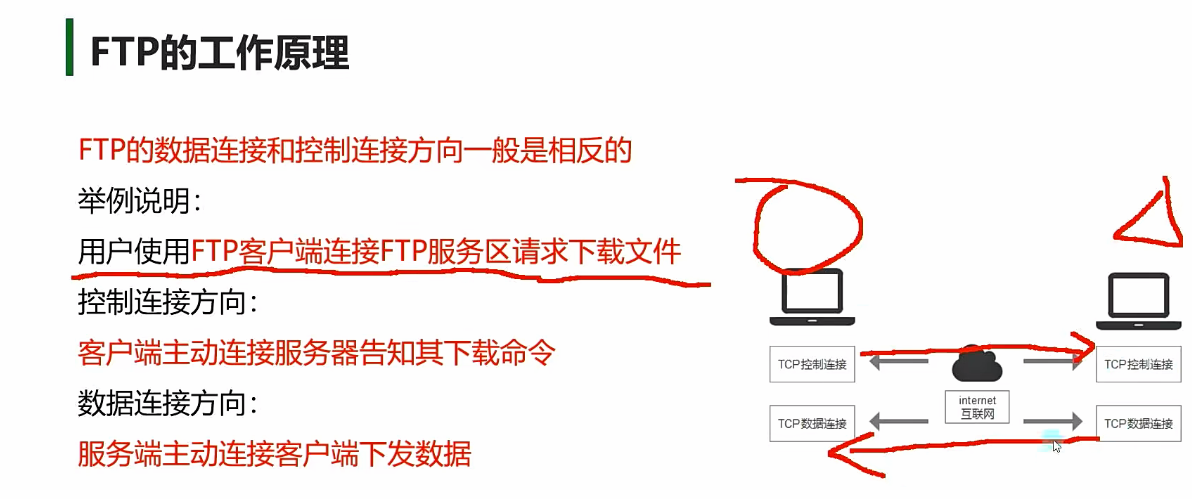
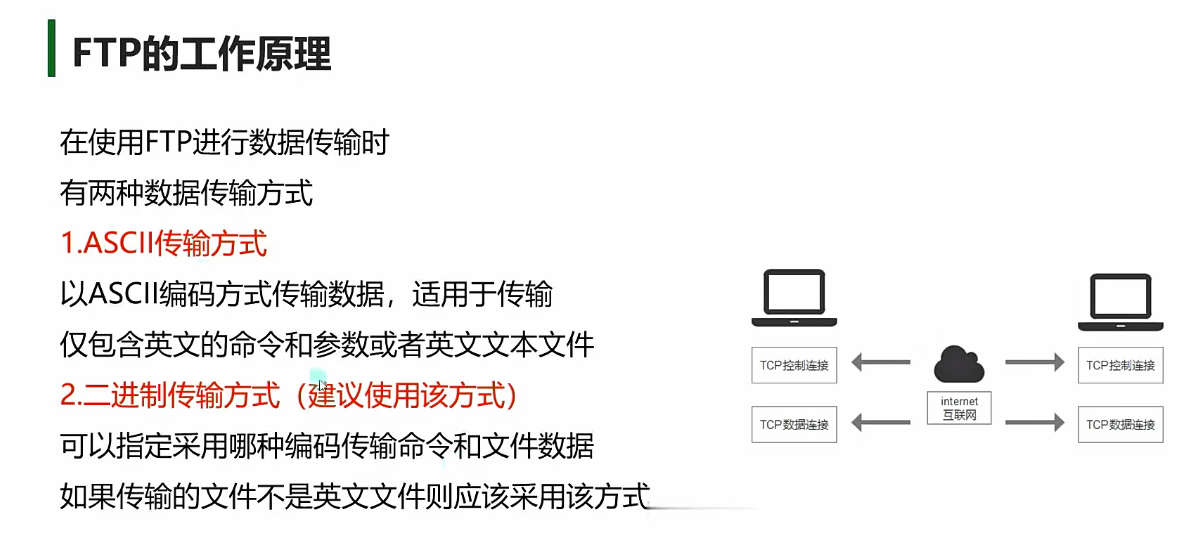
文件传输FTP FTP(File Transfer Protocol,文件传输协议)是一种用于在网络上传输文件的标准协议,尤其适用于在客户端和服务器之间高效地上传或下载文件。FTP的本质是TCP通信,通过FTP传输文件,双方至少需要建立2个TCP连接
作用 :允许用户通过网络在两台主机之间传输文件(上传、下载、删除、重命名等),(一般使用在游戏当中的上传和下载的功能,原生Ab包的上传和下载,语音通话的功能,上传下载语音内容)。工作模式 :
主动模式(PORT) :服务器主动连接客户端的指定端口(可能被防火墙阻挡)。被动模式(PASV) :客户端连接服务器的随机端口(更适用于客户端位于防火墙后的场景)。
如何搭建FTP服务器?
使用别人做好的FTP服务器软件
自己编写FTP服务器应用程序,基于FTP的工作原理,用Socket中的TCP通信来进行编程
将电脑搭建为FTP文件共享服务器
FTP关键类
NetWorkCredential类:提供用于基于密码的身份验证的凭据(用户名、密码、域)。
FtpWebRequest类:封装FTP协议的请求,用于上传/下载文件、列出目录等操作。
FtpWebResponse类:封装FTP服务器的响应,提供状态码、响应流等信息。
1 2 3 4 5 6 7 8 9 10 11 12 13 14 15 16 17 18 19 20 21 22 23 24 25 26 27 28 29 30 31 32 33 34 35 36 37 38 39 40 41 42 43 44 45 46 47 48 49 50 51 52 53 54 55 56 57 58 59 60 61 62 63 64 65 66 67 68 69 70 71 #region NetWorkCredential类凭证通信类 NetworkCredential n = new NetworkCredential("User" ,"123456" ); #endregion #region FtpWebRequest类 FtpWebRequest ftp = (FtpWebRequest)WebRequest.Create("ftp://127.0.0.1/test.txt" ); ftp.Abort(); Stream s = ftp.GetRequestStream(); FtpWebResponse res = (FtpWebResponse)ftp.GetResponse(); ftp.Credentials = n; ftp.Method = WebRequestMethods.Ftp.UploadFile; ftp.Method = WebRequestMethods.Ftp.DownloadFile; ftp.Method = WebRequestMethods.Ftp.DeleteFile; ftp.Method = WebRequestMethods.Ftp.MakeDirectory; ftp.Method = WebRequestMethods.Ftp.ListDirectory; ftp.Method = WebRequestMethods.Ftp.Rename; ftp.KeepAlive = true ; ftp.UseBinary = true ; ftp.RenameTo = "test2.txt" ; #endregion #region FtpWebResponse类 FtpWebResponse req = ftp.GetResponse() as FtpWebResponse; req.Close(); Stream str = req.GetResponseStream(); long length = req.ContentLength; FtpStatusCode code = req.StatusCode; WebHeaderCollection headers = req.Headers; print(req.ContentType); #endregion
如何上传文件到FTP服务器? 基本流程如下:
1 FtpWebRequest req = FtpWebRequest.Create(new Uri("ftp://127.0.0.1/test.png" )) as FtpWebRequest;
设置通信凭证(如果不支持匿名登录,就必须设置), 请求完毕后是否关闭连接,如果需要关闭,则设置为false
1 2 3 req.Credentials = new NetworkCredential(FTP_USER_NAME,FTP_PASSWORD); req.Proxy = null req.KeepAlive = false ;
1 req.Method = WebRequestMethods.Ftp.UploadFile;
1 Stream upLoad = req.GetRequestStream();
1 2 3 4 5 6 7 8 9 10 using (FileStream file = File.OpenRead("本地路径" )){ byte [] buffer = new byte [1024 ]; int contentLength = file .Read(buffer,0 ,buffer.Length); while (contentLength != 0 ){ UpLoad.Write(buffer,0 ,contentLength); contentLength = file .Read(buffer,0 ,buffer.Length); } UpLoad.Close(); file .Close(); }
1 2 3 4 5 6 7 8 9 10 11 12 13 14 15 16 17 18 19 20 21 22 23 24 25 26 27 28 29 30 31 32 33 34 35 36 37 38 39 40 41 42 public async void UploadFile (string path,string localPath,UnityAction callback = null await Task.Run(()=>{ try { FtpWebRequest req = FtpWebRequest.Create(new Uri(FTP_PATH + path)) as FtpWebRequest; NetworkCredential n = new NetworkCredential(FTP_USER_NAME,FTP_PASSWORD); req.Credentials = n; req.KeepAlive = false ; req.Proxy = null ; req.Method = WebRequestMethods.Ftp.UploadFile; req.UseBinary = true ; Stream UpLoad = req.GetRequestStream(); using (FileStream file = File.OpenRead(localPath)){ byte [] buffer = new byte [1024 ]; int contentLength = file .Read(buffer,0 ,buffer.Length); while (contentLength != 0 ){ UpLoad.Write(buffer,0 ,contentLength); contentLength = file .Read(buffer,0 ,buffer.Length); } UpLoad.Close(); file .Close(); } } catch (Exception e){ Debug.LogError(e.Message); } }); Debug.Log("上传文件完成" ); callback?.Invoke(); }
从FTP服务器下载文件到本地? 基本流程如下:
1 FtpWebRequest req = FtpWebRequest.Create(new Uri("ftp://127.0.0.1/test.png" )) as FtpWebRequest;
设置通信凭证(如果不支持匿名登录,就必须设置), 请求完毕后是否关闭连接,如果需要关闭,则设置为false
1 2 3 req.Credentials = new NetworkCredential(FTP_USER_NAME,FTP_PASSWORD); req.Proxy = null req.KeepAlive = false ;
1 req.Method = WebRequestMethods.Ftp.DownloadFile;
1 2 FtpWebResponse res = req.GetResponse() as FtpWebResponse; Stream DownLoad = res.GetResponseStream();
1 2 3 4 5 6 7 8 9 using (FileStream file = File.Create("本地路径" )){ byte [] buffer =new byte [1024 ]; int contentLength = DownLoad.Read(buffer,0 ,buffer.Length); while (contentLength != 0 ){ file .Write(buffer,0 ,contentLength); contentLength = DownLoad.Read(buffer,0 ,buffer.Length); } }
1 2 3 4 5 6 7 8 9 10 11 12 13 14 15 16 17 18 19 20 21 22 23 24 25 26 27 28 29 30 31 32 33 34 35 36 37 38 39 40 41 42 43 44 public async void DownloadFile (string path,string localPath,UnityAction callback = null await Task.Run(()=>{ try { FtpWebRequest req = FtpWebRequest.Create(new Uri(FTP_PATH + path)) as FtpWebRequest; req.Credentials = new NetworkCredential(FTP_USER_NAME,FTP_PASSWORD); req.KeepAlive = false ; req.Proxy = null ; req.Method = WebRequestMethods.Ftp.DownloadFile; req.UseBinary = true ; FtpWebResponse res = req.GetResponse() as FtpWebResponse; Stream DownLoad = res.GetResponseStream(); using (FileStream file = File.Create(localPath)){ byte [] buffer = new byte [1024 ]; int contentLength = DownLoad.Read(buffer,0 ,buffer.Length); while (contentLength != 0 ){ file .Write(buffer,0 ,contentLength); contentLength = DownLoad.Read(buffer,0 ,buffer.Length); } file .Close(); DownLoad.Close(); } } catch (Exception e){ Debug.LogError(e.Message); } }); callback?.Invoke(); }
FTP的其他操作
删除文件
获取每一个文件的大小
创建文件夹
获取文件列表
对于Ftp的其他操作的一般流程都是类似的,都需要首先创建ftp连接,设置通信凭证,但是不同的操作有不同的命令操作,因此需要不同的命令操作,同时在命令操作后需要(FtpWebResponse res = req.GetResponse() as FtpWebResponse;)向ftp服务器发送命令请求同时获取服务器的响应。
1 2 3 4 5 6 7 8 9 10 11 12 13 14 15 16 17 18 19 20 21 22 23 24 25 26 27 28 29 30 31 32 33 34 35 36 37 38 39 40 41 42 43 44 45 46 47 48 49 50 51 52 53 54 55 56 57 58 59 60 61 62 63 64 65 66 67 68 69 70 71 72 73 74 75 76 77 78 79 80 81 82 83 84 85 86 87 88 89 90 91 92 93 94 95 96 97 98 99 100 101 102 103 104 105 106 107 108 109 110 111 112 113 114 115 public async void DeleteFile (string path,UnityAction callback = null await Task.Run(()=>{ try { FtpWebRequest req = FtpWebRequest.Create(new Uri(FTP_PATH + path)) as FtpWebRequest; req.Credentials = new NetworkCredential(FTP_USER_NAME,FTP_PASSWORD); req.KeepAlive = false ; req.Proxy = null ; req.Method = WebRequestMethods.Ftp.DeleteFile; FtpWebResponse res = req.GetResponse() as FtpWebResponse; res.Close(); } catch (Exception e){ Debug.LogError(e.Message); } }); callback?.Invoke(); } public async void GetFileSize (string path,UnityAction<long > callback = null await Task.Run(()=>{ try { FtpWebRequest req = FtpWebRequest.Create(new Uri(FTP_PATH + path)) as FtpWebRequest; req.Credentials = new NetworkCredential(FTP_USER_NAME,FTP_PASSWORD); req.KeepAlive = false ; req.Proxy = null ; req.Method = WebRequestMethods.Ftp.GetFileSize; FtpWebResponse res = req.GetResponse() as FtpWebResponse; int size = (int )res.ContentLength; res.Close(); callback?.Invoke(size); } catch (Exception e){ Debug.LogError(e.Message); } }); } public async void CreateDirectory (string path,UnityAction callback = null await Task.Run(()=>{ try { FtpWebRequest req = FtpWebRequest.Create(new Uri(FTP_PATH + path)) as FtpWebRequest; req.Credentials = new NetworkCredential(FTP_USER_NAME,FTP_PASSWORD); req.KeepAlive = false ; req.Proxy = null ; req.Method = WebRequestMethods.Ftp.MakeDirectory; FtpWebResponse res = req.GetResponse() as FtpWebResponse; res.Close(); } catch (Exception e){ Debug.LogError(e.Message); } }); callback?.Invoke(); } public async void ReadFileList (string path,UnityAction<List<string >> callback = null await Task.Run(()=>{ try { FtpWebRequest req = FtpWebRequest.Create(new Uri(FTP_PATH + path)) as FtpWebRequest; req.Credentials = new NetworkCredential(FTP_USER_NAME,FTP_PASSWORD); req.KeepAlive = false ; req.Proxy = null ; req.Method = WebRequestMethods.Ftp.ListDirectory; FtpWebResponse res = req.GetResponse() as FtpWebResponse; StreamReader reader = new StreamReader(res.GetResponseStream()); List<string > nameStrS = new List<string >(); string line = reader.ReadLine(); while (line != null ) { nameStrS.Add(line); line = reader.ReadLine(); } reader.Close(); res.Close(); callback?.Invoke(nameStrS); } catch (Exception e){ Debug.LogError(e.Message); } }); }
测试 1 2 3 4 5 6 7 8 9 10 11 12 13 14 15 16 17 18 19 20 21 22 23 24 25 26 27 28 29 30 31 32 33 using UnityEngine;public class Test :MonoBehaviour { public FtpMgr ftpMgr; void Start () { FtpMgr.Instance.DownloadFile("test.png" ,Application.persistentDataPath+"/test.png" ,()=>{ Debug.Log("下载完成" ); }); FtpMgr.Instance.UploadFile("test.png" ,Application.persistentDataPath+"/test.png" ,()=>{ Debug.Log("上传完成" ); }); FtpMgr.Instance.DeleteFile("test.png" ,()=>{ Debug.Log("删除完成" ); }); FtpMgr.Instance.GetFileSize("test.png" ,(size)=>{ Debug.Log("文件大小:" +size); }); FtpMgr.Instance.ReadFileList("test.png" ,(list)=>{ foreach (var item in list) { Debug.Log("文件名:" +item); } }); FtpMgr.Instance.CreateDirectory("test" ,()=>{ Debug.Log("创建完成" ); }); } }
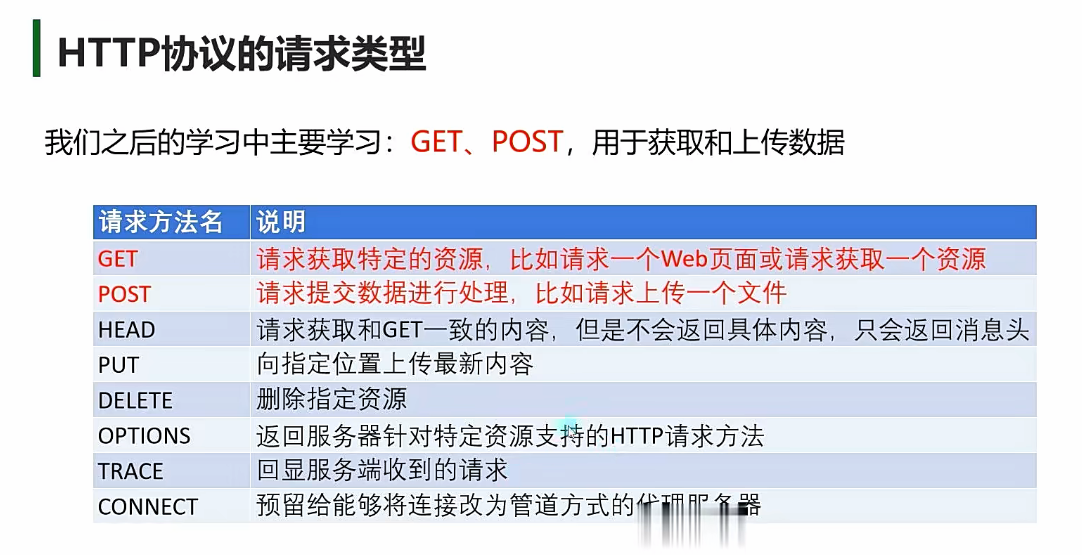
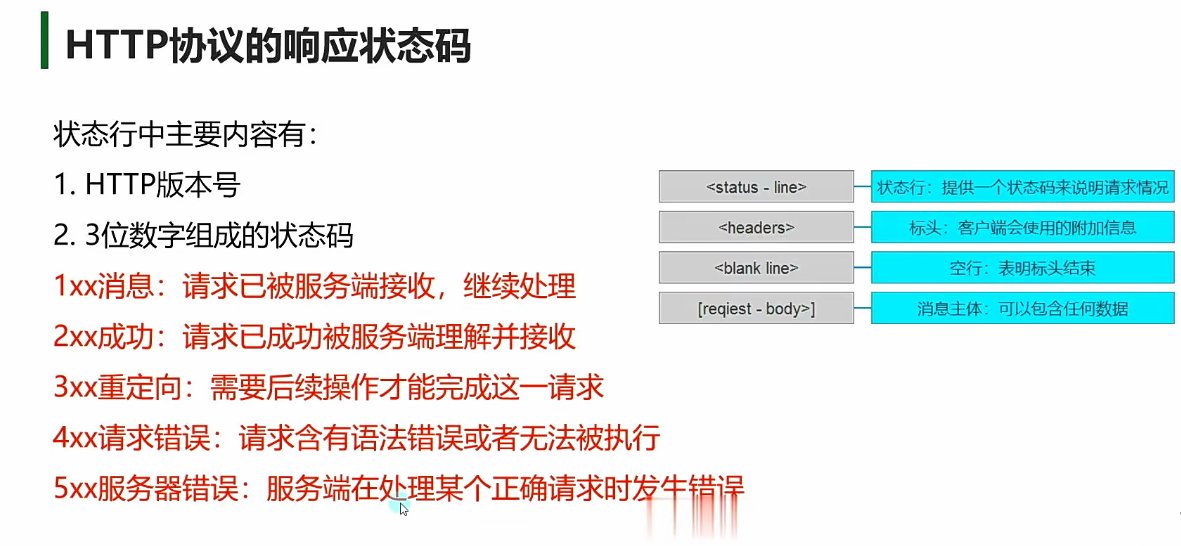
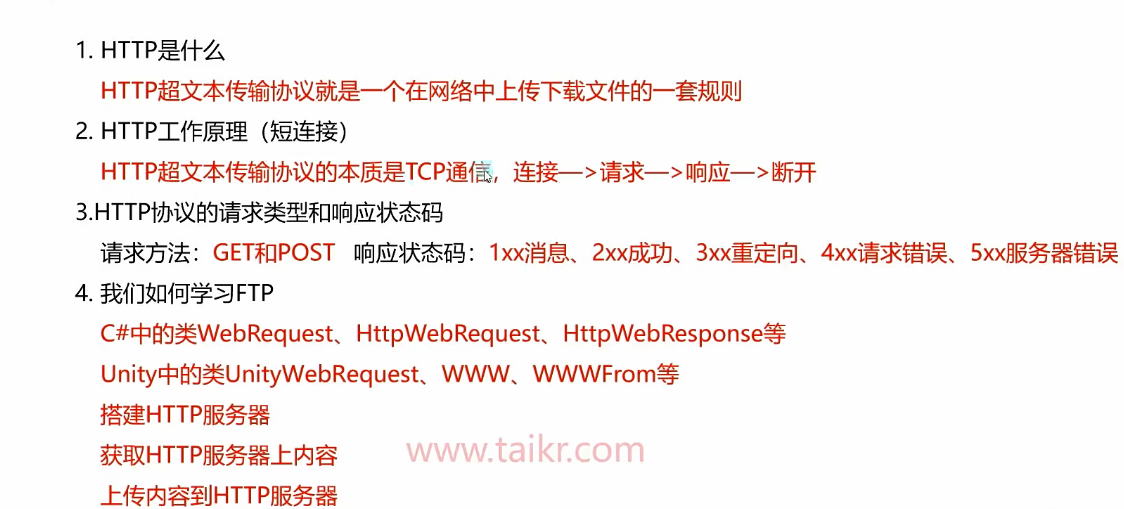
超文本传输HTTP HTTP(HyperText Transfer Protocol,超文本传输协议)是用于在客户端(如浏览器)和服务器之间传输数据的应用层协议。HTTP是以TCP方式工作的,连接,请求,响应,端口,接收的数据是有序的不会丢包。
无状态性(Stateless)
持久连接(HTTP/1.1默认)
早期HTTP/1.0每次请求需新建TCP连接,效率低。
HTTP/1.1+ :默认复用TCP连接(Connection: keep-alive),减少延迟。
缓存控制
通过响应头减少重复请求:
1 Cache-Control: max-age=3600 // 缓存1小时
安全性(HTTPS)
HTTP + TLS加密 (端口443),防止数据窃听或篡改。
请求前通过SSL握手建立安全通道。
如何搭建HTTP服务器?
使用别人做好的HTTP服务器软件,一般作为资源服务器时使用该方式
自已编写HTTP服务器应用程序,一般作为Web服务器或者短连接游戏服务器时使用该方式
HTTP关键类
如何获取HTTP服务器上的内容? 如何上传内容到HTTP服务器?