
Xml
数据持久化
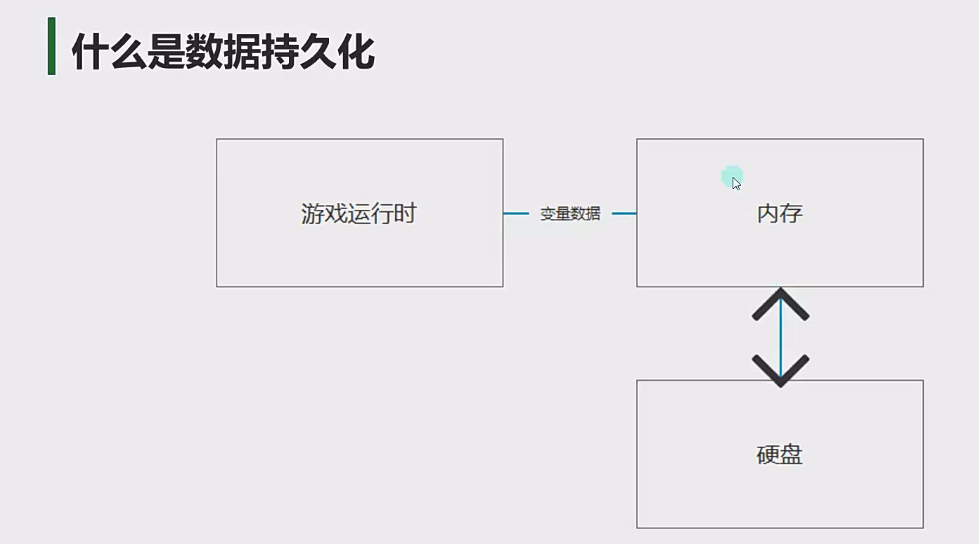
数据持久化是指将应用程序中的临时数据(如游戏进度、玩家设置等)永久保存到存储设备(硬盘、SD卡等)中的过程,以便在应用程序关闭后再次启动时能够恢复这些数据。
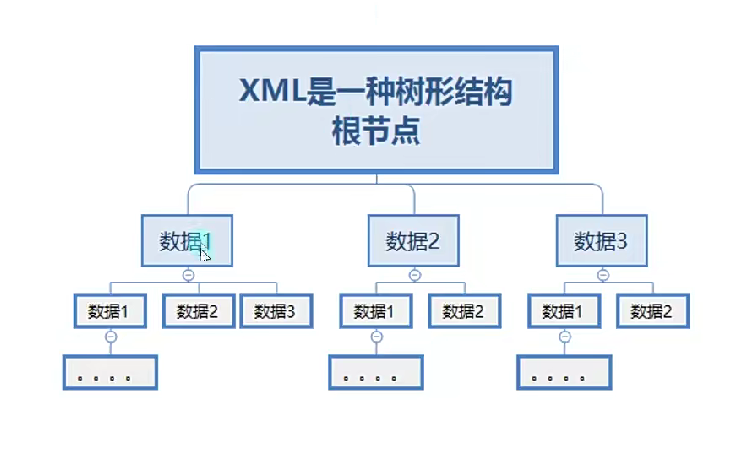
Xml
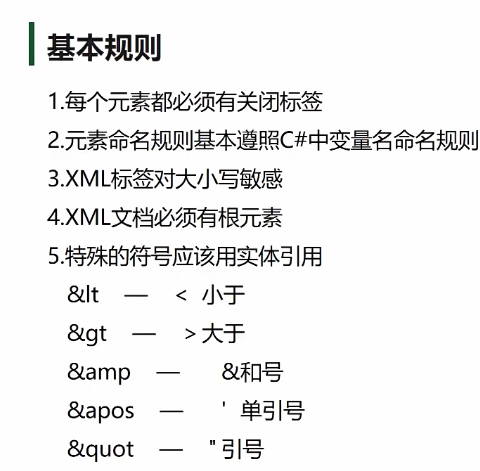
固定语法
1 | <!--版本和编码格式--> |
在C#中读取XML文件的方法
在C#中,你可以使用多种方式读取XML文件。以下是几种常用的方法:
1. 使用XmlDocument类(传统方式)
1 | using System.Xml; |
2. 使用XDocument类(LINQ to XML,推荐方式)
1 | using System.Xml.Linq; |
3. 使用XmlReader类(流式读取,适合大文件)
1 | using System.Xml; |
4. 反序列化为对象(推荐用于结构化数据)
首先定义一个与XML结构对应的类:
1 | [] |
然后使用XmlSerializer反序列化:
1 | using System.Xml.Serialization; |
本博客所有文章除特别声明外,均采用 CC BY-NC-SA 4.0 许可协议。转载请注明来源 岁迹!
相关推荐

2026-06-27
2进制
字符串类型以及非字符串类型转换为字节数组分别使用BitConverter类和Encoding类进行转换 12byte[] bytes = BitConverter.GetBytes(1); //非字符串byte[] bytes1 = Encoding.UTF8.GetBytes("11111"); //字符串 字节数组转为其他类型的数据 12int i = BitConverter.ToInt32(bytes,0); string str = Encoding.UTF8.GetString(bytes1);//这个字符数组全是字符串 对于如何将类序列化,不能直接使用C#中的BinaryFormatter进行2进制的序列化,因为是C#语言的规则与其他语言的兼容性不好,如果使用它那么其他语言开发的服务器无法进行反序列化,使用需要自定义处理类对 文件写入以及创建12345678910111213141516FileStream fs = File.Create(path);//创建文件------------------------------------...
2026-06-27
PlayerPrefs
数据持久化数据持久化是指将应用程序中的临时数据(如游戏进度、玩家设置等)永久保存到存储设备(硬盘、SD卡等)中的过程,以便在应用程序关闭后再次启动时能够恢复这些数据。 PlayerprefsPlayerPrefs是Unity提供的一个简单的键值对存储系统(键:string类型,值: int float string),用于在游戏会话之间保存和加载玩家偏好设置或简单游戏数据。它是Unity中最基础的数据持久化解决方案,是Unity提供的可以用于存储玩家数据的公共类 轻量级存储:适合存储少量简单数据(如设置、分数等) 跨平台:在所有Unity支持的平台上工作 自动持久化:数据会保存在设备本地 三种数据类型:支持int、float、string三种基本类型 关于Playerprefs最基础的用法是直接使用Set方法进行数据的存储,但是在运行的过程中只会存储在内存中,需要在结束时,Unity会自动将其存入硬盘中。如果游戏运行的过程中崩溃,那么则不会存储在硬盘中。可以使用自带的Api,Save方法进行自动存储。 12345678910using UnityEngine;public ...
2026-06-27
Json
2026-06-27
变量
2.1 变量 变量:变量相当于内存中一个数据存储空间的表示,你可以把变量看做是一个房间的门牌号,通过门牌号我们可以找到房间,而通过变量名可以访问到变量(值)。 变量:变量是程序的基本组成单位 变量的三个基本要素:类型 + 名称 + 值 示例:int a = 1 类型 int 名称 a 值 1 如何声明变量: 1234int a;//声明变量a,给变量a一块空间a = 100;int b = 100;//变量的赋值,将100赋值给bint c = 5, d; 2.2 变量使用注意事项 变量表示内存中的一个存储区域。不同变量,不同类型,占用的空间大小不同。如 int 有 4 byte,而 double 有 8 byte。 该区域有自己的名称 变量名 和类型 数据类型 变量必须先声明,后使用。 123int a;a=10;System.out.println(a); 变量在同一作用域内不能重名。 该区域的数据值可以在同一类型范围内变化。 变量的三个基本要素:类型 + 名称 + 值 2.3 程序中 +号的使用 当左右两边都是数值型,做加法运算 当左右两边任意一方...
2026-06-27
代码随想录刷题
数组二分查找二分查找这道题目的前提是数组为有序数组,同时题目还强调数组中无重复元素,因为一旦有重复元素,使用二分查找法返回的元素下标可能不是唯一的,这些都是使用二分法的前提条件,当大家看到题目描述满足如上条件的时候,可要想一想是不是可以用二分法了。 二分查找涉及的很多的边界条件,逻辑比较简单,但就是写不好。例如到底是 while(left < right) 还是 while(left <= right),到底是right = middle呢,还是要right = middle - 1呢? 大家写二分法经常写乱,主要是因为对区间的定义没有想清楚,区间的定义就是不变量。要在二分查找的过程中,保持不变量,就是在while寻找中每一次边界的处理都要坚持根据区间的定义来操作,这就是循环不变量规则。 写二分法,区间的定义一般为两种,左闭右闭即[left, right],或者左闭右开即[left, right)。 12345678910111213141516public class Solution { public int Search(int[] nums,...
2026-08-22
《黑神话:悟空》系统拆解(模块化)
📄 完整 Markdown 版下载:黑神话悟空拆解.md 分析范式:以机制拆解为核心,按游戏模块逐一拆解,包含数值推导、战斗循环还原、设计意图评价与缺陷剖析。技能与武器名称统一采用游戏内官方中文译名。数值以游戏内实测、官方更新说明与社区大样本统计三角验证为主,推测性内容均已标注。 目录 1. 前言 2. 模块一:基础操作(底层动作逻辑) 3. 模块二:棍法/武器系统 4. 模块三:角色/天命人系统(数值与性能) 5. 模块四:技能生态(丹药/法宝/法术) 6. 模块五:变化系统(化身/变身) 7. 模块六:攻防博弈设计 8. 模块七:BOSS/怪物生态 9. 模块八:关卡与探索设计 10. 模块九:叙事系统 11. 模块十:局外成长系统 12. 模块十一:横向对比 13. 附录:关键数值速查表 1. 前言 文档定位:以机制拆解为核心的游戏设计分析文档,将《黑神话:悟空》按游戏模块逐一拆解。 分析对象:《黑神话:悟空》,游戏科学开发的动作角色扮演游戏(ARPG),以中国古典名著《西游记》为世界观基础。 为...